The Internet has become a basic need for every individual, whether they are a student, an employee, or a business owner. We are also one of them. But have you ever thought about how you are using it? Is it the right way? Most of us browse the internet in very basic ways, search, open tabs, move between pages and collect information.
Now imagine a browser that does not just show you information. But a browser that actually helps you to understand your information, summarising it and even helps you in taking action on it. That is exactly what AI browsers are developed to do.
Working on AI Browsers is like having a virtual assistant that helps you find what you need. You can ask questions, get instant answers, summarize articles and even generate content without leaving your browser.
Here is one problem. There are already quite a few AI browsers out there and not all of them are worth your time. Some are genuinely very useful, while others just add AI features without really improving your experience. So which one should you actually use?
In this guide, I will break down the best AI browsers, what they do well, where they fall short and which one makes the most sense for you.
What is an AI Browser?
An AI browser is a web browser that has artificial intelligence built directly into it. So instead of just showing you links, it helps you to understand, summarize, and even act on the information you find online. A traditional browser helps you find information while an AI browser helps you use that information instantly.
A simple example
Suppose you are researching “best laptops for students.” In a regular browser, you will simply open multiple websites, compare specs, read reviews, and maybe even take notes.
In an AI browser, you can ask something like “What is the best laptop under ₹60,000 for students?” It will give you a summarized answer, key comparisons, and sometimes even recommendations in seconds.
This is where things start to feel different. Here you are interacting, asking, refining, and getting results much faster. That is exactly why AI browsers are becoming popular. They reduce manual effort, save time and make the whole browsing experience feel smarter and more personalized.
The Best AI Browser(At-A-Glance)
The table given below will give you a clear understanding of the best AI browsers right now.
| AI Browser | Best For | Key Highlight | Pricing |
| Perplexity Comet | Research and quick answers | Real-time AI search with summarized responses | Free + Paid plans |
| Dia | Minimal AI browsing | Clean interface with built-in AI assistance | Free (limited info) |
| ChatGPT Atlas | Productivity and content tasks | Deep ChatGPT integration inside browser workflow | Free + Paid (Plus) |
| Microsoft Edge | Every day use with AI | Copilot integration for browsing + productivity | Free |
| Opera One | Multitasking and built-in tools | AI + sidebar tools + tab management features | Free |
Perplexity Comet
Perplexity Comet feels less like a traditional browser and more like a research assistant built into your tabs. What makes it stand out is how naturally it blends real-time search with AI answers. So instead of digging through links, you get clear and cited responses right away. If your work involves a lot of reading, researching or verifying information, Comet will be the best choice.
Key Features of Perplexity Comet
- Real-time AI answers with sources: You do not just get answers, you get citations alongside them. This makes it much easier to trust and verify what you are reading.
- Ask follow-up questions directly: Instead of starting a new search every time, you can refine your query like a conversation and go deeper without losing context.
- Summarizes web pages instantly: Open a long article and Comet can break it down into key points within seconds. It saves a lot of reading time.
- Focused, clutter-free interface: It keeps distractions low and puts the AI interaction front and center. This makes the experience feel faster and more intentional.
- Great for research workflows: Even if you are a student or working on content, it helps you in gathering, comparing, and understanding information much quicker.
Perplexity Comet Pros
- It gives you accurate answers with proper sources.
- It is excellent for research and learning.
- It reduces the need to open multiple tabs.
- It has a smooth follow-up questioning experience.
- It has a clean and easy-to-use interface.
Perplexity Comet Cons
- It is not ideal for general browsing or entertainment.
- Comet is still evolving, so features can feel limited compared to full browsers.
- It has a heavy reliance on AI. Therefore, it may not suit users who prefer manual browsing.
Perplexity Comet Pricing
Perplexity Comet offers a free version with basic features. For more advanced capabilities like better models and deeper research features, there is a paid plan available (typically under a Pro subscription).
Dia
Dia takes a very different approach compared to most AI browsers. Instead of trying to do everything, it focuses on keeping things simple, clean and quietly helpful. The AI is there when you need it, but it does not overwhelm your browsing experience. If you like minimal tools that still make your work easier, Dia feels surprisingly smooth to use.
Key Features of Dia
- Built-in AI assistance without clutter: The AI is integrated in a way that does not interrupt your browsing, so you can use it when needed without feeling distracted.
- Clean and minimal interface: Dia removes unnecessary elements and keeps the focus on content. This makes browsing feel lighter and faster.
- Quick summaries and assistance: You can highlight content or ask for help and Dia will simplify or explain it without needing extra tools.
- Distraction-free experience: This is not like feature-heavy browsers. Dia avoids overloading you with panels and sidebars, which helps maintain focus.
- Lightweight performance: It runs smoothly without consuming too many resources. This thing makes it ideal for everyday use.
Dia Pros
- It is simple and easy to use.
- It has a clean and distraction-free interface.
- It is helpful AI and mainly it does not get overwhelming.
- Good performance and speed.
- It is ideal for focused work sessions.
Dia Cons
- It has fewer advanced AI features compared to competitors.
- It is not as powerful for deep research tasks.
- It has limited ecosystem and integrations.
- It is still relatively new, so feature set may grow over time.
Dia Pricing
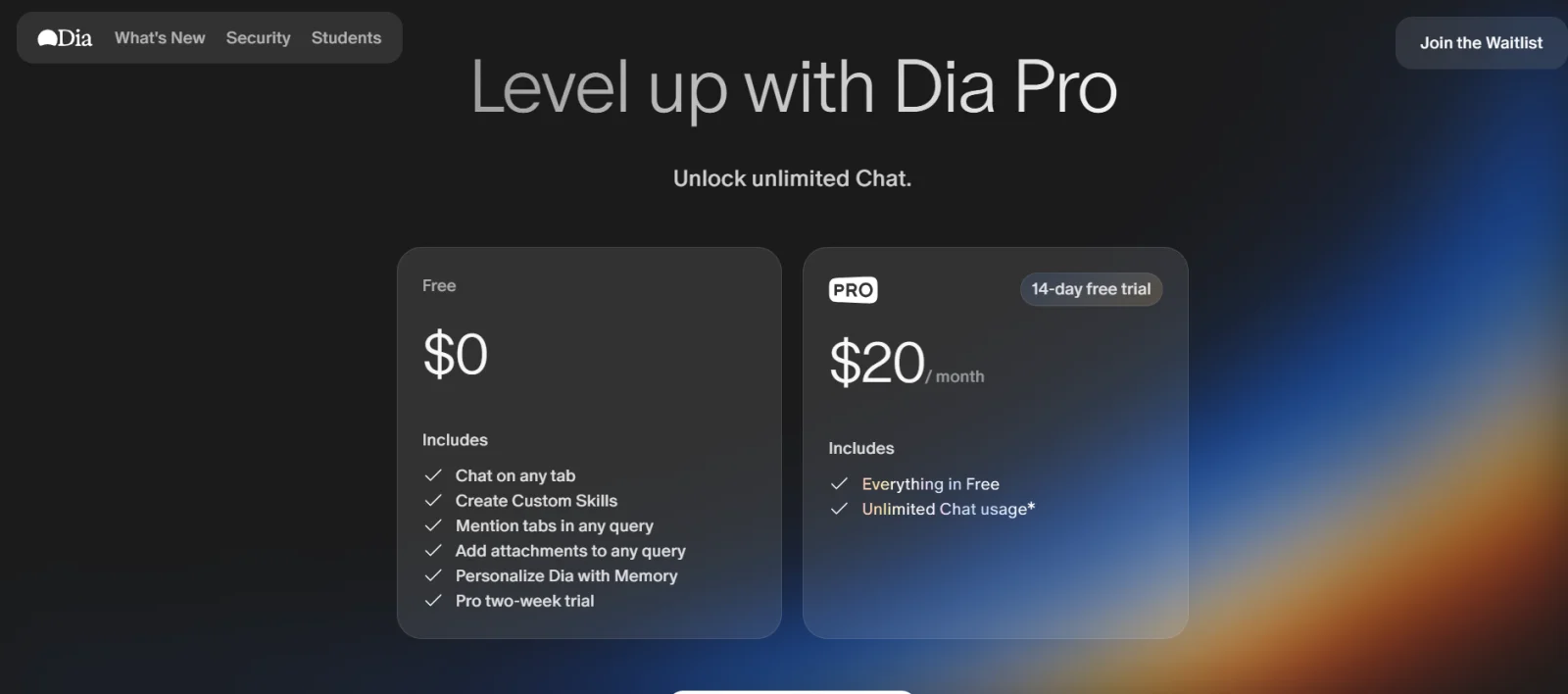
Dia is currently available for free, though detailed pricing tiers or advanced plans are still limited or evolving as the product develops.
ChatGPT Atlas
ChatGPT Atlas is built around one simple idea. What if your browser did not just show websites, but actually worked with you while you browse? Instead of switching between tabs, tools and ChatGPT, Atlas brings everything into one place and lets the AI understand what you are looking at in real time.
What makes it unique is how deeply ChatGPT is integrated. It is not just an add-on or sidebar feature. It is the core of the browser, helping you read, write, analyze and even complete tasks without breaking your flow.
Key Features of ChatGPT Atlas
- ChatGPT built directly into the browser: You do not need to copy-paste content anymore. Atlas understands the page you are on and helps you instantly, right where you are.
- Context-aware answers and summaries: Ask questions about any webpage and it responds based on what you are currently viewing. This makes research and reading much faster.
- Agent mode for task automation: This is where it gets interesting. Atlas can actually perform actions like clicking, navigating or completing tasks on websites for you (in paid plans).
- Rewrite and content assistance: You can edit, simplify or rewrite text directly inside the browser without switching tools.
- Memory and personalization: It can remember useful context from your browsing (with controls). It helps in giving more relevant answers over time.
ChatGPT Atlas Pros
- It has deep integration with ChatGPT that makes everything faster.
- No need to switch between tabs or tools.
- It is excellent for writing, research and productivity.
- It gives context-aware responses that feel more accurate.
- It’s agent mode adds real automation power.
ChatGPT Atlas Cons
- It is still in limited availability (mainly macOS for now).
- Some advanced features locked behind paid plans.
- It can raise privacy concerns due to memory and data usage.
- It may reduce direct interaction with websites (AI summarizes instead).
ChatGPT Atlas Pricing
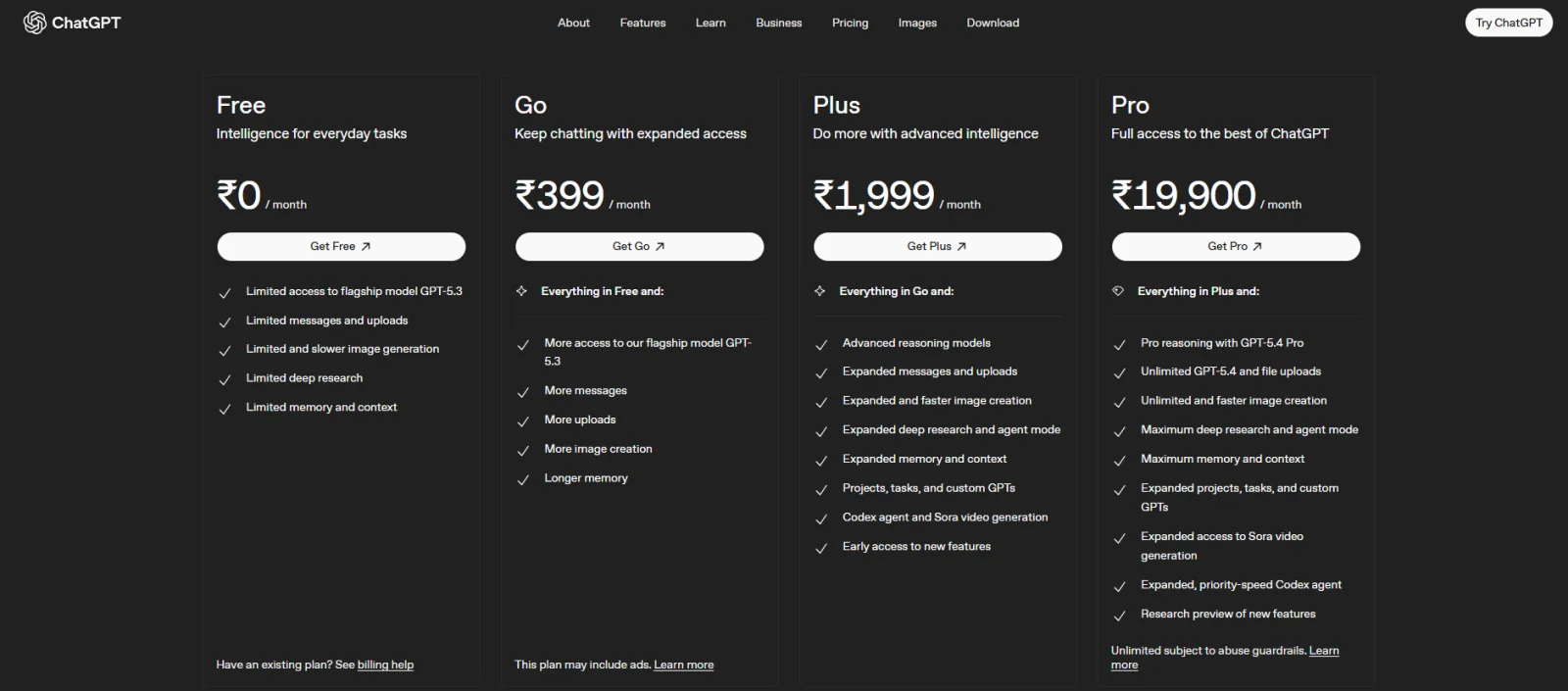
ChatGPT Atlas follows a freemium model. You can use basic features for free, but advanced capabilities like agent mode and enhanced AI features are available with ChatGPT Plus or Pro subscriptions.
Microsoft Edge
Microsoft Edge is probably the most familiar name on this list, but with Copilot built in, it is no longer just a regular browser. What makes it stand out is how naturally AI fits into your everyday browsing. You do not need to install anything extra. It is already there, ready to help you search, summarize, compare and even take actions while you browse.
If you want an AI browser that feels powerful but still familiar, Edge is one of the easiest to start with.
Key Features of Microsoft Edge
- Built-in Copilot AI assistant: Copilot is integrated directly into Edge. So you can chat, ask questions and get help without leaving your browser.
- Summarizes pages, PDFs and videos: You can instantly break down long content into simple insights. This saves a lot of time during research.
- Multi-tab analysis and comparison: It can look across multiple tabs and help you compare information without switching back and forth.
- Voice and chat interaction: You can talk to Copilot or type your queries. It makes browsing feel more interactive and flexible.
- Deep integration with Microsoft ecosystem: Works smoothly with tools like Word, Excel and other Microsoft services. This is making it great for productivity workflows.
Microsoft Edge Pros
- It is completely free to use for most features.
- It is easy to use, especially if you are already on Windows.
- It has strong productivity features with Copilot.
- It is great for research, summaries and quick tasks.
- It is available across desktop and mobile.
Microsoft Edge Cons
- AI features can feel slightly intrusive at times
- It is limited memory compared to advanced AI tools
- Privacy concerns if too many permissions are enabled
- Not as “AI-first” as newer browsers like Comet or Atlas
Microsoft Edge Pricing
Microsoft Edge is completely free to use, including its built-in Copilot features. However, there is also Copilot Pro. It is a paid upgrade that offers faster performance and deeper integration with Microsoft tools.
Opera One
Opera One takes a slightly different route compared to other AI browsers. Instead of focusing only on AI, it combines AI with a bunch of built-in tools that make browsing more efficient. You get an integrated assistant, smart tab management and useful features all in one place, so you do not have to rely on extensions.
What makes Opera One stand out is how it balances AI with everyday usability. It is not just about asking questions. It is about making your overall browsing experience smoother.
Key Features of Opera One
- Built-in AI assistant (Aria): Opera includes its own AI assistant that you can use for searching, writing and quick help without leaving your browser.
- Smart tab management (Tab Islands): Tabs are automatically grouped based on context. This makes multitasking much easier and less chaotic.
- Integrated tools in the sidebar: You get quick access to apps, messengers and tools directly from the sidebar. It is reducing the need to switch tabs.
- Content generation and assistance: You can generate text, get summaries or refine content directly within the browser.
- Lightweight and visually clean design: Despite having many features, Opera One manages to keep the interface smooth and user-friendly.
Opera One Pros
- All-in-one browser with built-in tools.
- AI assistants are easy to access and use.
- It is great for multitasking and managing tabs.
- There is no need for multiple extensions.
- It has a smooth and visually appealing interface.
Opera One Cons
- AI features are not as advanced as dedicated AI browsers.
- It can feel feature-heavy for minimal users.
- Some tools may not be useful for everyone.
- AI accuracy can vary depending on queries.
Opera One Pricing
- Opera One is completely free to use, including its built-in AI features like Aria.
Which AI Browser is Best for You?
By now, you have probably noticed something. There is no single best AI browser for everyone and for doing everything. Each one is built for a slightly different type of user and workflow.
AI browsers are evolving fast, but most of them fall into two categories. Some act like smart assistants that help you browse better, while others go further and actually perform tasks for you. So instead of asking which is the best, the better question is: which one fits how you work?
Best for Research and Studying: Perplexity Comet
- If you spend a lot of time reading articles, doing assignments or gathering information, then Comet is easily the strongest option for you.
- It does not just show results, it explains, summarizes and cites sources. This makes it perfect for learning and research-heavy work.
Best for Writing, Productivity and Daily Tasks: ChatGPT Atlas
- If your work involves writing, content creation or managing tasks, then Atlas will be like a natural fit for you.
- It can read pages, rewrite content and even automate actions by making it more like a productivity assistant than just a browser.
Best for Everyday Use: Microsoft Edge
- If you do not want to switch to something completely new, then Edge is the easiest option for you.
- You get AI features like summaries, chat and content help, but inside a browser that already feels familiar.
Best for Simple and Distraction-Free Browsing: Dia
- If you do not like complicated tools and just want something clean with light AI help, then Dia is a good pick.
- It focuses on minimalism and clarity, rather than packing in too many features.
- If you juggle a lot of tabs, tools, and apps, Opera One stands out. It is designed to keep everything organized in one place with features like tab grouping and a built-in AI assistant.
Wrap-Up
As you all know now, AI browsers are changing how we search, read, and work online. They help you in understanding information and using it faster. Each of them offers something different from their research-focused tools.
The best choice among them totally depends on your needs. First, you need to understand what your needs are. Then, if you want faster answers, better multitasking or built-in assistance, there is an option that fits your workflow. As AI keeps evolving, these browsers will quickly become a smarter way to browse the web.
FAQs
1. Which is the best AI browser right now?
It depends on your needs but popular options include Perplexity Comet, ChatGPT Atlas, and Microsoft Edge.
2. Are AI browsers free to use?
Most AI browsers offer free versions. Yet, some advanced features may require a paid plan.
3. Can AI browsers replace traditional browsers?
No, AI browsers can not replace traditional browsers completely right now. But they are becoming a smarter and more efficient alternative.
4. Are AI browsers safe to use?
They are generally safe but you should always check privacy settings and permissions before using them.