Are you preparing for a PHP Developer interview? Excellent career choice, I must say. PHP (Hypertext Preprocessor) is a server-side programming language used to build scripts for dynamic websites and mobile APIs. It is cost-effective and supports various data sources like MySQL, PostgreSQL, Oracle, SQLite, Sybase, generic ODBC, etc.
Building a career in the PHP scripting language can be very useful in today's dynamic industry. But how? I am here to help you with the most asked PHP interview questions and detailed answers. These are curated by the top industry experts and apt for each level of individuals.
Let’s begin with the most basic PHP interview questions and answers for beginners. These include the fundamental concepts and general definitions.
PHP is one of the most used server-side scripting languages. It is embedded in HTML to create interactive web pages and applications. The examples of its uses are blogs, e-commerce sites, and complex systems. It offers simplicity, broad database support, cross-platform compatibility, and robust tools to manage content, sessions, and forms. The common features of PHP are:
A session is a mechanism that includes storing data on the server to be used across multiple pages during a single user's visit. It also enables state management for the otherwise stateless HTTP protocol. This allows a web application to remember and recognize a specific user as they navigate the site. The popular examples includes:
Variables are used to store data that can change during execution. Constants are also used to store data, but that will remain unchanged. Variables give flexibility, while constants provide safety by preventing accidental modification. Here is a more detailed comparison between them.
| Feature | Variables | Constants |
| Value Change | Can be changed anytime | Cannot be changed after assignment |
| Memory Behavior | Value stored and updated | Stored once and stays fixed |
| Use Case | Inputs, counters, calculations | Fixed values like π, tax rate |
| Syntax (general) | $x = 10; | const PI = 3.14 |
| Impact on Code | More flexible | Safer, prevents accidental modification |
$message is a normal variable, and $$message is a variable variable. In simple words, the value inside $message becomes the variable name for $$message. This means if $message = 'name', then $$message refers to $name.
There are various variables in PHP. The table given below explains all:
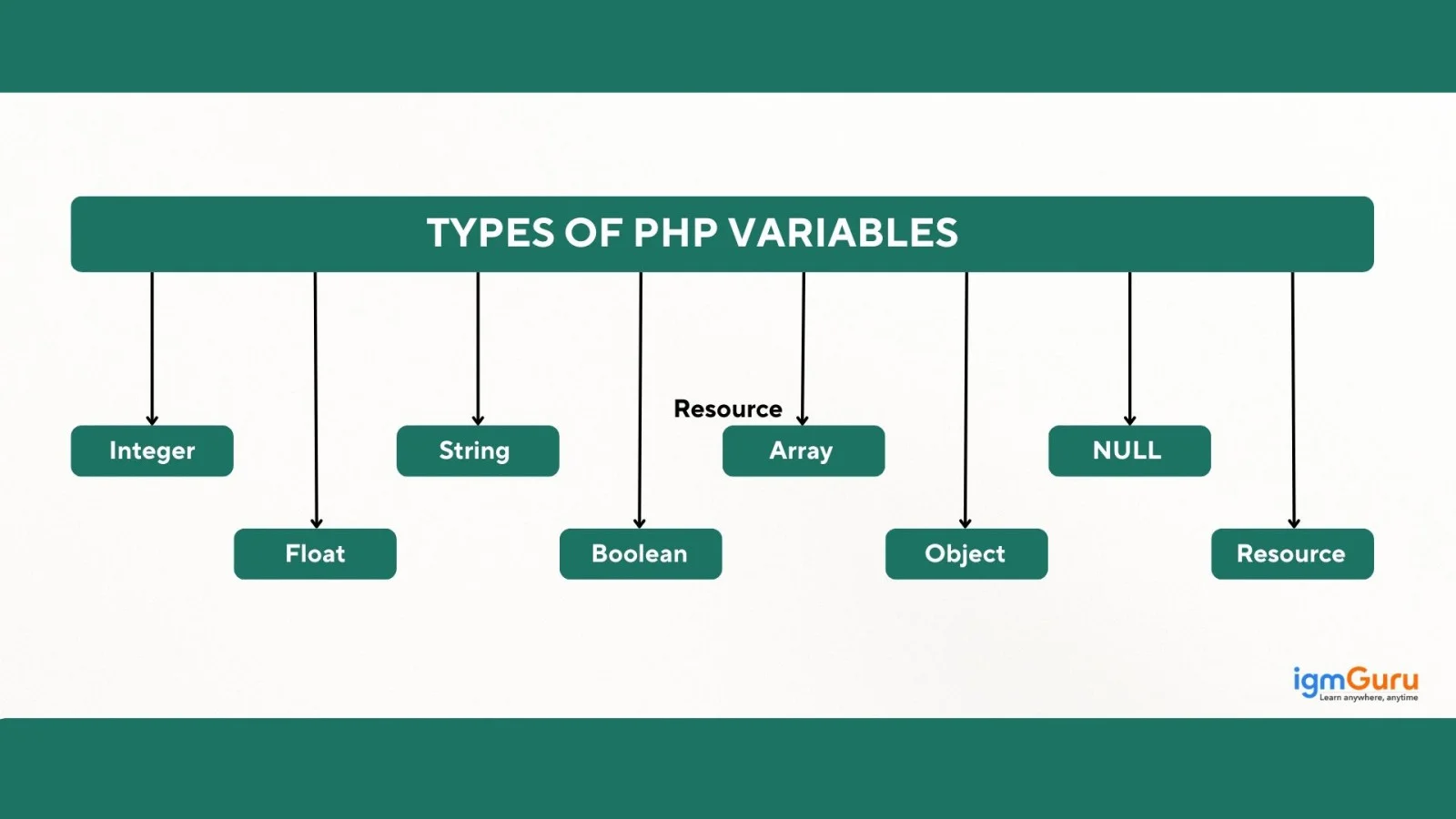
| Data Type | Description | Example |
| Integer | Represents whole numbers without decimals. | $age = 25; |
| Float / Double | Represents numbers with decimal points. | $price = 99.99; |
| String | Represents text enclosed in quotes. | $name = "Sanjay"; |
| Boolean | Holds either true or false. | $isActive = true; |
| Array | Stores multiple values in a single variable. | $colors = ["red", "blue", "green"]; |
| Object | Instance of a class; used for OOP. | class Car {} $c = new Car(); |
| NULL | Represents a variable with no value. | $data = NULL; |
| Resource | Holds reference to external resources like files or DB connections. | $file = fopen("test.txt", "r"); |
Superglobals are special variables that are always accessible in any scope (global, local, function, etc.) within a script. The best part is that the process does not need to use any global keyword. They also provide automatic access to important data like server info, user input, sessions, cookies, and file uploads. This data should be stored in associative arrays like $_SERVER, $_GET, $_POST, $_SESSION for easy handling in web applications.
The main difference between them is:
To fully remove everything, we usually use both. Refer to this table before using them:
| Feature | session_unset() | session_destroy() |
| Ends the session completely | No | Yes |
| Deletes the session file | No | Yes |
| Session ID becomes invalid | No | Yes |
| Requires session_start() | Yes | Yes |
PHP is a server-side scripting language and ASP.NET is a web development framework. There are various differences between them depending on features, nature and use cases. Here are some of them:
| Feature | PHP | ASP.NET |
| Type | Scripting language | Web application framework |
| Platform | Runs on Linux, Windows, macOS | Mostly Windows (but ASP.NET Core is cross-platform) |
| Language | Only PHP | C#, VB.NET, F# |
| Cost | Completely free | Free as a framework, but often requires paid Windows hosting |
| Performance | Fast for small to medium apps | High performance & suited for enterprise applications |
| Security | Good, but depends on developer | Strong built-in security features |
| Database Support | MySQL, PostgreSQL, MariaDB, MongoDB, etc. | SQL Server, MySQL, Oracle, PostgreSQL |
| Learning Curve | Easy for beginners | Medium to complex |
| Community Support | Very large open-source community | Strong enterprise and Microsoft-backed support |
| Hosting | Cheap Linux hosting | Usually, more expensive Windows hosting |
PEAR (PHP Extension and Application Repository) is a framework and distribution system. It provides a structured library of reusable code components. It was among the most useful frameworks on this scripting language, but it is now considered largely deprecated. The modern PHP community has shifted its focus to Composer as the standard for managing project dependencies.
It is possible to use JavaScript and PHP together. In fact, they complement each other when using together. You can use them in tandem in web development. They are also used to manage different parts of an application like PHP for server-side operations and JavaScript for client-side interactivity.
Example: Fetching data from a database and then printing that data into a JavaScript variable or configuration object that the client-side script can use.
|
Also Read: How to set up MySQL in Docker?
Now, it is time to dive into some technical concepts. Here are some of the most asked PHP technical interview questions and answers.
It is done via using a combination of variables, in-memory management (garbage collection), server-side mechanisms (sessions and form handling), and external systems like databases and files. It processes data on the server, stores it temporarily or permanently, and sends the output back to the browser. Here are some process and their explanation:
| Process | How PHP Manages It? | Example |
| Temporary storage | Variables | $x = 10; |
| Type handling | Dynamic data types | $name = "John"; |
| User input | $_GET, $_POST, $_REQUEST | $_POST['email'] |
| User login data | Sessions | $_SESSION['id'] |
| Browser storage | Cookies | setcookie() |
| Uploading/Reading files | File functions | fopen(), file_get_contents() |
| Permanent storage | Database (PDO/MySQLi) | $pdo->query() |
| Memory cleanup | Garbage collection | Auto-managed |
The rules for naming variables help to ensure that the code is easy to read and execute. Here are common one with examples:
| Rule | Description | Example |
| Starts with $ | Every PHP variable must begin with a dollar sign. | $name |
| Must start with a letter or underscore | The first character after $ cannot be a number. | $age, $_value |
| Can contain letters, numbers, and underscores | Only alphanumeric characters and underscores are permitted. | $user_id, $amount2 |
| No spaces allowed | Variable names must be continuous without spaces. | $totalAmount |
| No special characters | Characters like -, @, %, *, ! are not allowed. | $student_mark |
| Case-sensitive | $name and $Name are treated as different variables. | $price, $Price (treated separately) |
Executing a PHP command line to run the a program involves the following steps:
There are various methods to hash a password. I prefer to use the password_hash() method for hashing and password_verify() to check the hashed password. It uses built-in hashing algorithms, automatically generates a salt and protects against brute-force and rainbow-table attacks. Here is an example showing how it is used:
|
|
There are four common types of eros one may face as a PHP developer:
| Error Type | Description | Example |
| Parse Error (Syntax Error) | Occurs when PHP cannot understand the code due to syntax issues. | Missing ; at the end of a line |
| Fatal Error | Happens when PHP finds something it cannot run at all (missing function, class). | Calling an undefined function |
| Warning Error | Non-fatal; script continues running but PHP shows a warning. | Including a missing file |
| Notice Error | Minor errors; script runs normally but PHP points out bad coding practices. | Using an undefined variable |
Here are some of the popular frameworks of this scripting language:
| Framework | Description |
| Laravel | The most popular PHP framework; known for elegant syntax, MVC architecture, built-in authentication, routing, migrations, and Eloquent ORM. Great for modern web apps. |
| Symfony | A powerful, scalable enterprise-level framework. Many CMS platforms and even Laravel components are built on Symfony. |
| CodeIgniter | Lightweight and fast; great for small to medium applications. Easy learning curve. |
| CakePHP | Follows the “Convention over Configuration” approach. Rapid development and strong security features. |
| Yii | High-performance component-based framework; suitable for large-scale apps. |
| Zend Framework / Laminas | Enterprise-ready, highly customizable framework used in large organizations. |
| Phalcon | Extremely fast PHP framework implemented as a C extension. Performance-focused. |
| FuelPHP | Full-stack framework supporting HMVC architecture and strong security features. |
| Slim Framework | A micro-framework used for REST APIs, small apps, and microservices. |
| PHPixie | Lightweight, modular HMVC framework designed for high performance. |
There are various CMS platforms built using this scripting language. Only a few of them are famous and widely used.
This scripting language has 4 types of loops, including:
| Loop Type | Description | Example |
| for loop | Runs a block of code a fixed number of times. | for($i=1; $i<=5; $i++) {} |
| while loop | Runs as long as a condition is true. | while($i <= 5) {} |
| do…while loop | Executes code at least once, then checks conditions. | do { } while($i <= 5); |
| foreach loop | Used to loop through arrays and objects. | foreach($arr as $value) {} |
The final keyword is used for preventing the modification or extension of classes and methods through inheritance. It is a powerful tool for enforcing design constraints and ensuring that certain parts of your codebase remain unchanged.
The final class is a special class that cannot be extended or inherited by any other class. Attempting to create a child class from a final class always results in an error.
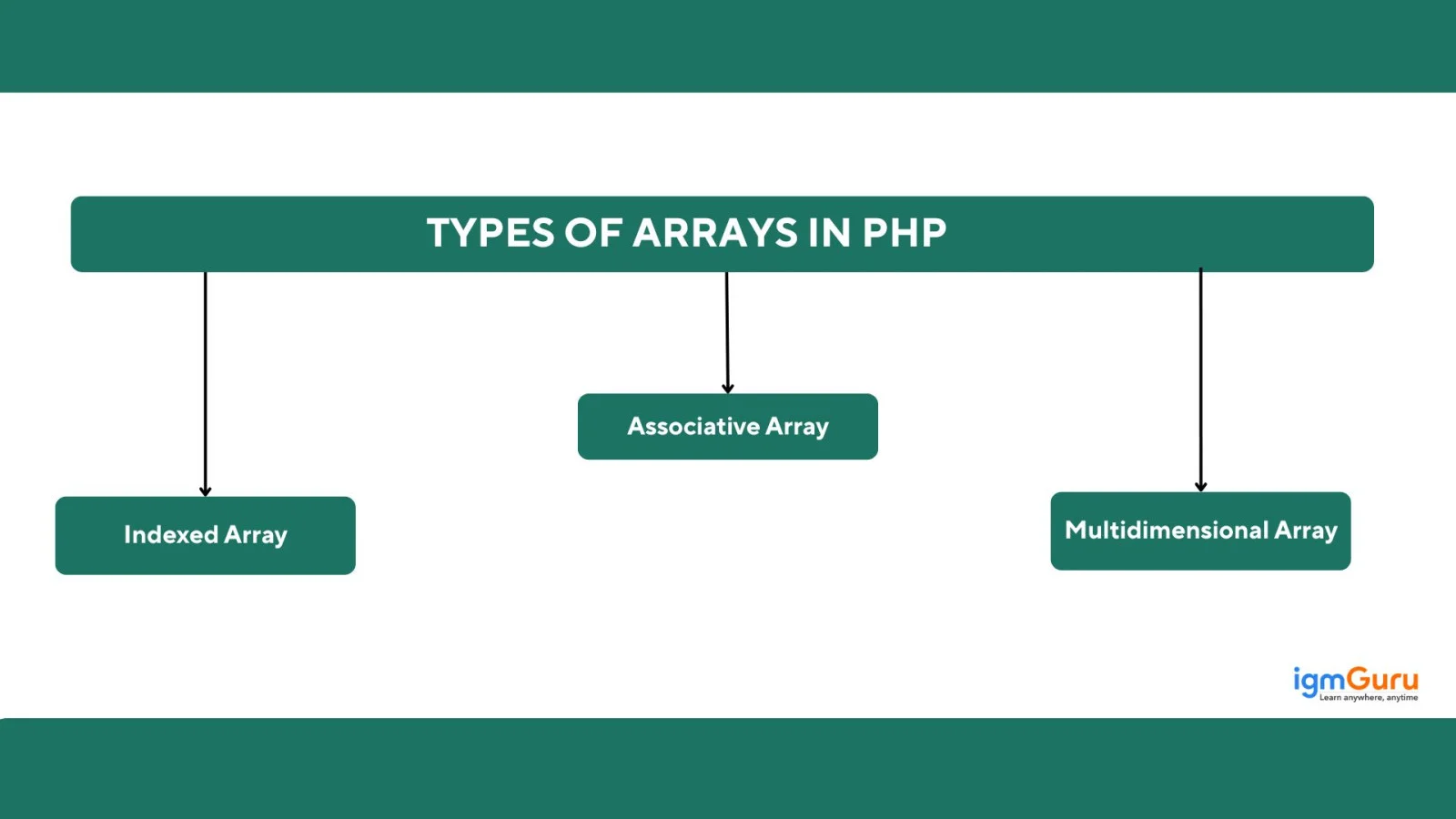
This scripting language supports three types of arrays, including:
| Array Type | Description | Example |
| 1. Indexed Array | Array with numeric indexes (0,1,2...). | $colors = ["red", "blue", "green"]; |
| 2. Associative Array | Array with named keys (strings). | $age = ["John" => 25, "Sanjay" => 28]; |
| 3. Multidimensional Array | An array containing one or more arrays inside it. | $users = [["John",25], ["Sanjay",28]]; |
Now, we will move to some of the most asked intermediate-level PHP interview questions and answers. These will help you to switch your job with a better salary.
Path Traversal (Directory Traversal) is a web security vulnerability. It allows the hacker to access files and directories stored outside the intended web root folder. It is done by manipulating file paths in a web application. This attack mostly occurs when the input user is not properly validated or sanitized before being used in file-related functions such as fopen(), file_get_contents(), or include().
PHP 7 introduced a new Zend engine with big performance and memory gains, added scalar type and return declarations, modern operators (??, <=>), improved error handling (Throwable/Error), and removed deprecated/unsafe extensions (e.g., mysql_*), so migrating requires testing but gives faster, safer code.
| Area | PHP 5 (typical) | PHP 7 |
| Core engine | Zend Engine (older) | New Zend Engine — big perf & memory gains. |
| Speed | Slower | ~2× faster for many apps. |
| Type system | Only limited type hints (class, array) | Scalar type hints + return types (optional). |
| Error handling | Fatal errors often unrecoverable | Error/Throwable lets you catch many errors. |
| Deprecated/removed | mysql_*, old extensions still present | Several old extensions removed; migration needed. |
| New syntax | Fewer modern operators | ??, <=>, anonymous classes, group use, etc. |
Parser reads your code, checks its structure, and converts it into a format the PHP interpreter can execute. It is basically a key to make your code interpreter friendly. Here are some of the key features and functions it provides:
Inheritance is a core concept of Object-Oriented Programming (OOP). It allows a new class to acquire the properties and methods of an existing class. This mechanism promotes code reusability, modularity, and the establishment of a logical hierarchy between related classes. All this creates an "is-a" relationship, e.g., a Dog is an Animal.
Both GET and POST are HTTP methods used to send data from the client (browser) to the server. But they behave differently in how they send, display, and secure that data. Here are the key differences:
| Feature | GET | POST |
| Visibility | Data is visible in the URL | Data is hidden (sent in HTTP body) |
| Security | Less secure (exposed in URL) | More secure than GET (not logged in URL) |
| Data Limit | Limited (URL limit ~2048 chars) | No practical limit (can send large data) |
| Use Case | Fetching data, search queries, filters | Submitting forms, login, sensitive data |
| Caching | Can be cached | Cannot be cached |
| Bookmarking | URL can be bookmarked | Cannot be bookmarked |
| Idempotence | Safe to repeat (does not change server state) | Not always safe to repeat |
| Speed | Slightly faster | Slightly slower (extra processing) |
Nullable types allow a variable, parameter, or function return value to accept either a normal type or null. They are defined using '?' before the type, like ?string. This helps handle optional or missing values safely. Here is an example showing how they are used:
|
Streams are used to read and write data from different sources, such as files, network connections, memory, and even remote URLs. It is done using the same set of functions. This requires you to use the PHP streams wrappers. Here are some of them:
| Wrapper | Purpose |
| file:// | Access local files |
| http://, https:// | Read data from web URLs |
| ftp:// | Access FTP resources |
| php://input | Read raw POST data |
| php://memory / php://temp | Temporary memory-based streams |
| php://stdout / php://stderr | Output streams |
| zip:// | Access files inside ZIP archives |
To prevent XSS, I prefer to escape all output using htmlspecialchars(), sanitize and validate user input, encode data in JS/URLs and use security headers like Content Security Policy (CSP). I never trust user-provided HTML and always escape data before displaying it. There are also different methods you can use, like
| Method | Purpose | Example |
| Escape output | Prevents HTML/JS execution | htmlspecialchars() |
| Sanitize input | Removes dangerous characters | filter_var() |
| Validate input | Ensure only expected data is accepted | FILTER_VALIDATE_EMAIL |
| Content Security Policy (CSP) | Blocks unauthorized scripts | default-src 'self' |
| Prepared Statements | Prevent harmful stored data | PDO + escaping output |
| Disable HTML in forms | Avoid injecting tags | Plain text only |
| Encode JS/JSON/URL | Prevent breaking into scripts | json_encode() |
The interface defines a set of methods that a class must implement. It acts like a blueprint for classes. This ensures consistency, structure, and polymorphism in OOP. These are created and use the interface with the following steps:
1. Define an Interface: Use the interface keyword by only declaring methods; no body, no logic.
Example:
|
2. Implement the Interface in a Class: A class uses the keyword implements to adopt the interface. The class must implement every method declared in the interface.
Example:
|
3. Create an Object of the Implementing Class: Now you can use the class normally.
|
4. Use Interfaces for Polymorphism: Different classes can implement the same interface:
|
5. This allows:
|
There are multiple methods for sharing an email using PHP. The most common and my favorite method is using mail(). This method works when the server is configured with mail services. Here is an example of email sharing using this scripting language:
|
This section includes some of the most asked role-specific (PHP developer) interview questions and answers. You will definitely face these types of questions in your interview.
The === operator checks both value and type.
Values match, types do not → false
|
Output:
|
In PHP, + converts both operands into numbers.
|
Output:
|
strcmp() is case-sensitive.
It returns a negative value (not equal).
|
Output:
|
strlen() counts spaces too. The string " PHP " has 5 characters.
|
Output:
|
empty() treats "0" as empty, so returns true.
|
Output:
|
. concatenates strings.
|
Output:
|
== only compares value.
Both are treated as true, so the result is true.
|
Output:
|
Logical NOT operator ! inverts value.
|
Output:
|
You cannot echo an array directly; PHP gives a warning and prints “Array”.
|
Output:
|
Null coalescing operator ?? checks:
Since $a is undefined → returns "Not Found"
|
Output:
|
This section discusses the most-asked PHP coding interview questions and answers. These are based on some common problems and their solutions.
|
|
|
|
|
|
|
|
|
|
Now, we will discuss some of the advanced PHP interview questions and answers, mostly useful for 5+ years of experienced professionals.
It has to be done incrementally and safely. I will use the following steps:
In this process, I will make sure that the changes are small, restore compatibility shims only when necessary, and clean them up after the upgrade.
This choice depends on the following factors:
| Factor | Laravel | Symfony | Lightweight or Custom Framework |
| Project Size & Complexity | Medium-sized apps, fast development, common features needed | Large, enterprise-level, highly structured systems | Very small apps, microservices, or performance-critical tools |
| Ecosystem & Speed of Development | When I need ready-made tools like Auth, Queues, API Resources, Blade, Horizon | When I need reusable components and strict architectural patterns | When I only need minimal components, and full frameworks would be overkill |
| Architecture Requirements | Flexible but structured MVC, rapid prototyping | Strict structure, long-term maintainability, complex domain logic | Custom architecture, minimal layers, full control over structure |
| Team Skillset | Team is comfortable with Laravel conventions | Team prefers Symfony’s component-driven design | Team is experienced in core PHP or needs minimal learning curve |
| Performance Needs | Good balance of features and performance | Strong architecture, but heavier than lightweight frameworks | Very high performance, low overhead, micro-level control |
| Longevity & Support | Fast-moving product development, active ecosystem | Enterprise-grade stability, long-term support cycles | Long-term control without depending on external framework cycles |
This means the choice mainly depends on project scale, required features, team experience, and performance considerations.
It improves readability by removing unnecessary parentheses when you only need to call a method on a freshly created object. This means instead of writing a new ClassName()->method(), you can write a new ClassName->method(). It is cleaner and reduces visual clutter. This makes the intent clearer because the focus stays on the method call rather than the object instantiation syntax.
They are quite useful as they let you inspect which error or exception handlers are currently active at runtime. This helps during debugging and monitoring as you can verify whether a framework, package, or custom code has replaced your handler, and detect conflicts. This also ensures that logging or reporting systems are actually being triggered. It gives much better visibility into what’s handling errors behind the scenes.
The updated DOM API aligns better with HTML5. This means you can now add more consistent parsing, better handling of modern HTML elements, and improved error recovery. It is mostly useful for backend developers as it makes server-side HTML manipulation far more reliable.
It is used in scraping pages, cleaning user-generated HTML, or building automated content processors. The DOM API now behaves closer to real browsers, which reduces bugs and unexpected parsing issues.
The SOLID principles are five fundamental design guidelines for object-oriented programming. They help developers in writing maintainable, scalable, and flexible codes. The following are the common SOLID principle:
Middleware is code that runs before or after a request hits your main application logic. In PHP frameworks like Laravel or Slim, it acts as a layer that can inspect, modify, or block the request or response.
Think of it as a middleman between the client and your controller. They manage tasks like authentication, logging, rate limiting, CORS headers, or input filtering. It matters because it keeps repeated cross-cutting logic out of controllers. This makes the request pipeline more organized and helps you apply certain rules globally or only on specific routes.
It can be done with the give function:
|
|
|
The following scenario-based PHP interview questions are designed to test your practical problem-solving skills, debugging ability, security awareness, and real-world development experience.
I would first identify the bottleneck using profiling and monitoring tools like Xdebug, Blackfire, or server logs. Then, I would check database query performance, unnecessary loops, memory usage, and external API delays.
After that, I would implement caching using Redis or Memcached, optimize SQL queries with indexes, compress assets, and reduce unnecessary file operations. If required, I would also use load balancing and CDN services to handle high traffic efficiently.
I would validate both file extension and MIME type before upload and only allow specific file formats like JPG, PNG, or PDF. I would also rename uploaded files, store them outside the public root directory, and disable script execution inside upload folders.
Additionally, I would limit file size, scan uploads for malware, and use server-level security rules to block execution of dangerous files like .php, .exe, or .sh.
I would immediately replace raw SQL queries with prepared statements using PDO or MySQLi. Prepared statements separate SQL logic from user input, which prevents attackers from injecting malicious queries.
I would also validate and sanitize user input, restrict database permissions, enable logging for suspicious activities, and review the entire application for unsafe query practices.
I would first inspect session configuration settings like session.gc_maxlifetime, cookie expiration time, and server cleanup policies. Then, I would check whether sessions are stored correctly on the server and verify that session_start() is called properly on all required pages.
I would also review browser cookie settings, HTTPS configuration, load balancer behavior, and server restarts that may be deleting active sessions unexpectedly.
I would design the API using REST principles with proper HTTP methods like GET, POST, PUT, and DELETE. I would return responses in JSON format with meaningful status codes and implement token-based authentication such as JWT or OAuth.
I would also validate all input data, apply rate limiting, use HTTPS for secure communication, handle errors properly, version the API, and document endpoints using tools like Swagger/OpenAPI for easier maintenance and integration.
This article has provided the most asked PHP interview questions for candidates of all levels. Exploring them, you will be ready to go for a PHP developer job role. Just keep practicing, learning and face interviews with confidence. You will definitely get your dream job.
Becoming a PHP developer completely depends on your dedication to learn and skills. If your goals are clear and preparation is solid, it will become very easy.
The salary of a PHP developer varies between 3LPA to 13LPA in India and $102,005 per annum in the USA.
There are various alternatives, including JavaScript, Python, Golang, Java, Elixir, Ruby, etc.
Articles You Can Also Read:
Course Schedule
| Course Name | Batch Type | Details |
| PHP Training | Every Weekday | View Details |
| PHP Training | Every Weekend | View Details |