Are you also facing challenges in preparing for your Informatica Interview? As a data integration professional working actively in the field, I can understand how challenging it can be to prepare for Informatica interviews. Over the years, I have observed a wide range of basic, technical and scenario-based questions, both as an interviewee and interviewer.
Therefore, to help the freshers, professionals and anyone who is preparing for Informatica-related job roles. I have compiled frequently asked Informatica interview questions and answers in this guide. This well-structured guide will help you build your confidence as well as understand the fundamentals, with the aim that you can crack your next Interview.
In this section, I have compiled up the most asked basic Informatica Interview questions with Answers:
Informatica is a popular data integration tool used in cloud data management and data integration. It helps in extracting data from different sources, transforming and loading. This process is known as ETL. It is widely used in data warehousing, business intelligence and data migration projects.
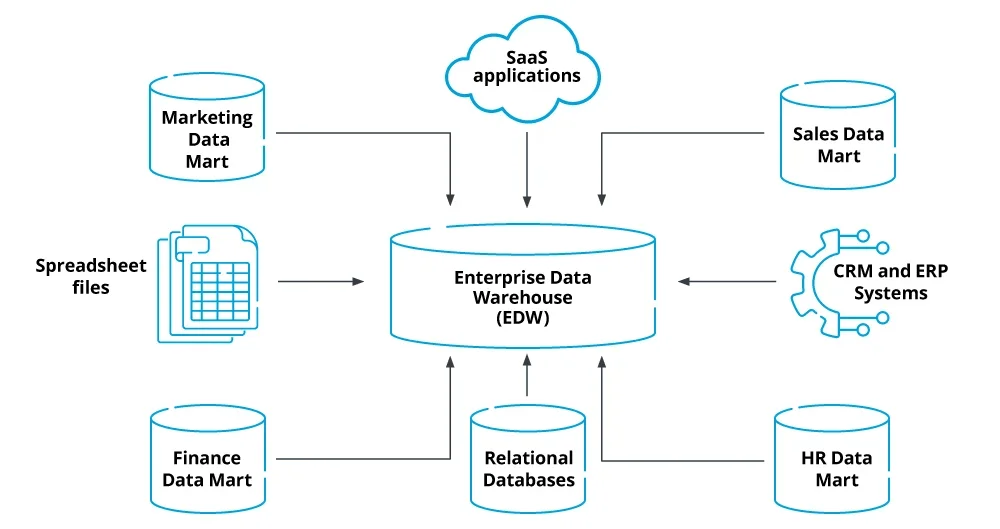
An Enterprise Data Warehouse (EDW) is a centralized system that stores all the important data from various departments of an organization. It collects data from multiple sources, organizes it and also makes it available for reporting and analysis. It acts as a single source for an entire organization, which enables better business decisions by giving a complete and consistent view of data. Additionally, EDW also supports business intelligence tools and reporting systems.
Target Load Order refers to the sequence in which data is loaded into multiple target tables. You can set the load order accordingly to control which table gets loaded first. This is useful when one target depends on data from another. By setting up a target load order, you can ensure that parent tables are updated before child tables to prevent errors that could arise from inconsistent data.
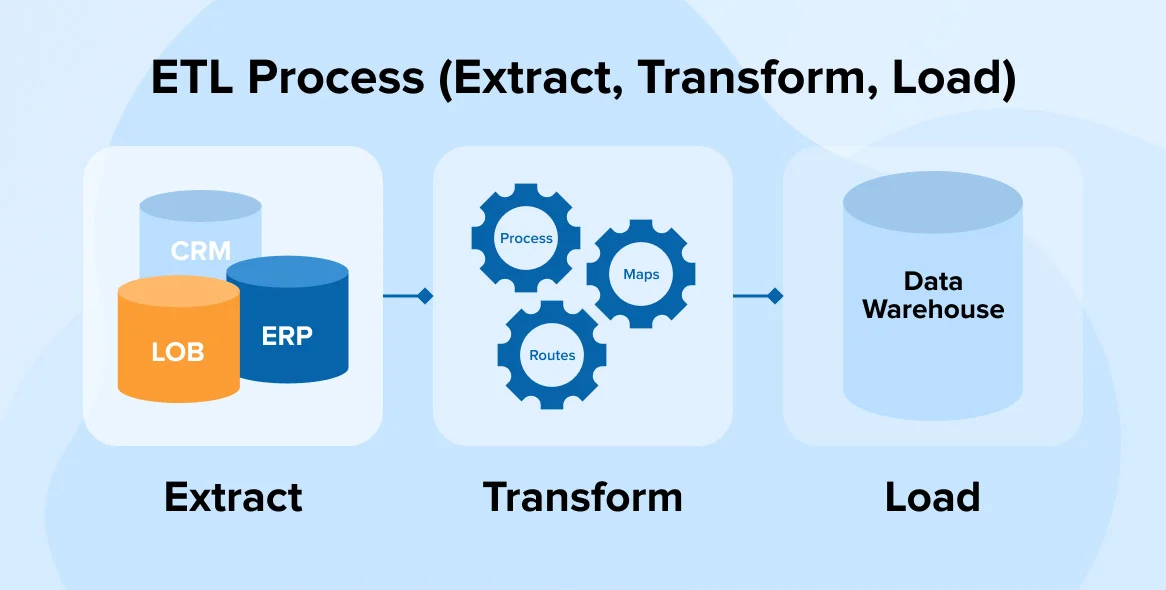
ETL stands for Extract, Transform and Load. It is a process used to move data from different sources into a single system. It allows organizations to consolidate data from disparate sources for data analysis and reporting.
An unconnected lookup can have any number of input parameters. It depends upon the need for the lookup condition. It always returns only one value to the calling transformation.
Informatica PowerCenter is one of the powerful data integration tools of ETL used to build and manage data warehouses. It allows the extraction of data from different sources, transformation and loading into target systems. PowerCenter is known for its user-friendly interface, strong connectivity, scalability, robust features and good performance. It is widely used in ETL processes to manage large volumes of data efficiently.
Domain is the primary unit of manufacturing and a basic administrative unit of this ETL platform. It is a collection of nodes and services like Repository Service, Integration Service, etc. A domain includes a master gateway node and worker nodes. The domain also hosts various application services like the Integration Service and Repository Service.
A Source Qualifier reads data from sources (e.g., databases, files) and generates SQL queries for relational sources, allowing basic filtering. While, a Filter Transformation filters rows later in the mapping based on user-defined conditions. The Source Qualifier works at the source level, while the Filter refines data within the mapping.
A mapping in Informatica PowerCenter defines the data flow from source to target. Its main components are:
A repository manager is a tool that helps you organize and control everything inside your repositories - like folders, files, user groups, and permissions. It makes it easy to move around between different folders and repositories, and lets you manage who can access or change what.
As per my knowledge, Informatica has several tools, however, the main components are:
Related Article- Hadoop Tutorial For Beginners
In this section, I have compiled up the most asked Intermediate level Informatica Interview Questions:
Transformations are used to modify and process data as it moves from source to target. Informatica transformations can be classified into active and passive transformations. Common transformations include Source Qualifier, Expression, Filter, Router, Union, Sorter, Aggregator, Joiner, Update Strategy, Lookup, Rank and Sequence Generator.
The output files that are created by the Informatica server at runtime are:
Informatica offers several advantages over other ETL tools. It has a user-friendly interface which can support a wide range of data sources. It can handle large volumes of data efficiently by ensuring high performance. It has robust features, scalability and comprehensive data integration capabilities. Additionally, it is expert in handling complex data transformations, provides strong data quality and governance features and also integrates well with both on-premises and cloud environments.
Data driven sessions allow different rows of data to follow different logic based on conditions set in the mapping. It uses a decision-making approach where the session behaves based on the definition of expressions or filters. For instance, some rows may be inserted while others may be updated or rejected. The data driven sessions are managed by using the Update Strategy transformation in the mapping.
A mapping parameter is a constant value during the entire session run until the session ends. You can define it before the session starts and it will not change while the session is running.
On the other hand, mapping variables can change during the session. Its value can be updated based on conditions and can also be reused in the next session run. The variables help in the tracking of incremental loads or changes.
An active transformation changes the number of passing rows. For instance, Filter and Aggregator are active because they may remove or group rows.
A passive transformation does not change the number of passing rows. Its work is to only modify the data without filtering any rows. For instance, Expression and Lookup.
A connected lookup is part of the main data flow and receives input directly from the pipeline. It can return multiple columns and is used when frequent lookups are needed.
An unconnected lookup is not connected to the main flow. It is called using the :LKP expression and it returns only one value. It is used when the lookup is required occasionally or conditionally.
Related Article- How to Become a Big Data Engineer?
From my experience, I have observed below given are the most asked advanced level Informatica Interview Questions:
pmcmd is a command line utility which is provided by Informatica PowerCenter. It is used to manage and interact with workflows and tasks within a PowerCenter domain. It allows users to start, stop, abort, schedule and perform other operations on workflows and tasks. It also manages connections to the integration service.
Using it involves the following steps:
Yes, we can store previous session logs. By default, it overwrites the session log with each run. If you want to keep old logs, then you will need to enable log file archiving.
Steps to store previous session logs:
There are different types of caches used in Informatica to optimize performance, particularly in transformations like Lookup, Aggregator, Joiner and Rank. These caches include Data Cache, Index Cache, Static Cache, Dynamic Cache, Persistent Cache, Recache (Refill Cache) and Shared Cache. Each of these caches serves a specific purpose in speeding up the data processing and lookups.
The role of Workflow Manager is used to design, create and manage workflows. A workflow defines the execution order of tasks like sessions, commands, emails, etc. The Workflow Manager allows you to link sessions, set dependencies, schedule tasks and configure properties. It helps in controlling the entire ETL process by organizing how and when data moves from source to target.
The DTM also known as the Data Transformation Manager process is one of the key components that runs during the execution of a session. When the Integration Service starts a session once, it creates the DTM process.
The DTM does the following things:
The Repository Manager is an administrative tool that helps manage metadata stored in the repository. It is used to create folders, manage users and permissions and organize ETL objects. Additionally, it also supports version control and object copying. Hence, it helps developers and admins maintain and secure all project related components in one place.
The server of Informatica rejects files when they are faced with issues like data type mismatch, constraint violations, transformation errors or target write failures. These rejected rows are saved in a reject file for troubleshooting.
Read Also- What is Big Data? Types, Uses and Role Explained
In this section, I have compiled the most asked Scenario-based Informatica Interview Questions and their answers. These types of questions are often asked to check your problem solving skills, clarity, experience level, etc. You can always answer in your own words, according to your knowledge, experience and situation.
Slowly Changing Dimensions (SCD) in informatia are handled using different techniques based on the type, they are:
Additionally, lookup and expression transformations are also used frequently to compare incoming and existing data.
In informatica, the process of loading data from a flat file to a target is as follows:
In Informatica, error handling is implemented using session logs, error tables and workflow logic to manage different types of errors from simple data validation issues to more complex system failures. Additionally, email tasks can also be used to send alerts when a session or workflow fails.
To optimize a mapping for better performance, the focus should be on reducing the number of transformations, filtering data early and pushing down logic to the database where you think is possible. Additionally, minimizing the data volume processed by the mapping and leveraging efficient transformations are recognized as their key strategies for the same.
The use of Workflow manager is done to schedule a workflow in Informatica. It is to create and configure the scheduler, setting the execution time and frequency. Afterwards Monitoring and adjusting schedules which are based on data processing needs makes sures about the optimal performance.
Incremental data loading in Informatica means loading only the new or updated records not the full data. This is done by using a mapping variable to store the last load timestamp. In each session, use a source filter to fetch records newer than the last timestamp. After loading, update the mapping variable with the current timestamp. Therefore, the next session picks only fresh data. This improves performance and saves resources in Informatica.
Mainly, duplicate records in Informatica can be handled by the sorter transformation. It checks all the distinct options to remove duplicates. Other ways to handle this include Aggregator transformations, SQL overrides or dynamic lookups. Still, the best approach depends on the source and target systems and also on the specific requirements for handling duplicates.
Read Also- Career Scope In Informatica in 2026
Below are some of the common Informatica interview questions and their answers. These are based on core topics.
Expression Transformation is used to calculate values in a single row. You can use it to perform operations like string manipulation, arithmetic calculations, conditional logic, and more. It is a passive transformation that does not affect the number of rows.
Filter Transformation is used to filter rows based on a specified condition. It passes only those rows that meet the filter condition and drops the rest. It is an active transformation as it changes the number of rows passed through.
Lookup Transformation is used to retrieve related data from a lookup table based on a matching condition. It can be connected or unconnected, and also helps in enriching the data flow by bringing in additional information.
Joiner Transformation is used to join two heterogeneous sources. It combines records from two pipelines based on a joint condition. It supports different types of joins like Normal, Master Outer, Detail Outer and Full Outer.
Update Strategy transformation is used to define row level operations like insert, update, delete or reject during the session. It helps control how data is written to the target based on business rules.
This guide has covered everything from basic to advanced level, as well as scenario-based interview questions along with answers. While the provided answers will give a strong base, yet you can always give answers in your way, sharing your own experience.
Always remember that the interviewer will want to test your problem-solving skills and clarity of thought. This guide will surely prepare you to confidently stand out in your Informatica Interview rounds.
To prepare for an Informatica interview, you are required to focus on ETL concepts, core transformations and real-time scenarios. You also need to practice building mappings and handling errors. Practice on tools like Workflow Manager and pmcmd.
No heavy coding is required. Informatica is a low-code ETL tool with a drag-and-drop interface. Yet, basic understanding of SQL and some scripting for pmcmd or expressions will be helpful in your Informatica career.
Freshers can apply for roles like ETL Developer (Junior), Informatica Developer (Trainee), Data Analyst, SQL Developer and Data Warehouse Developer.
Yes, SQL is very important because Informatica works with databases. Strong query knowledge increases job chances.